Console gaming has evolved far beyond simply plugging in a controller and pressing start. According to recent NPD Group data, the number of gamers in the United States has increased by 32 million since 2018, with gamers now spending an average of 14 hours per week on their devices. This surge in gaming activity means that the right accessories can dramatically impact your performance, comfort, and overall experience.
Whether you’re a competitive esports player, a casual weekend warrior, or someone who enjoys 82% of global consumers who engaged with gaming content during recent years, the accessories you choose can transform your console gaming setup from basic to extraordinary. This comprehensive guide explores proven ways to enhance your PlayStation, Xbox, Nintendo Switch, or any other console gaming experience through strategic accessory upgrades.
Essential Controller Accessories: Maximizing Control and Precision
Controller Enhancement Options
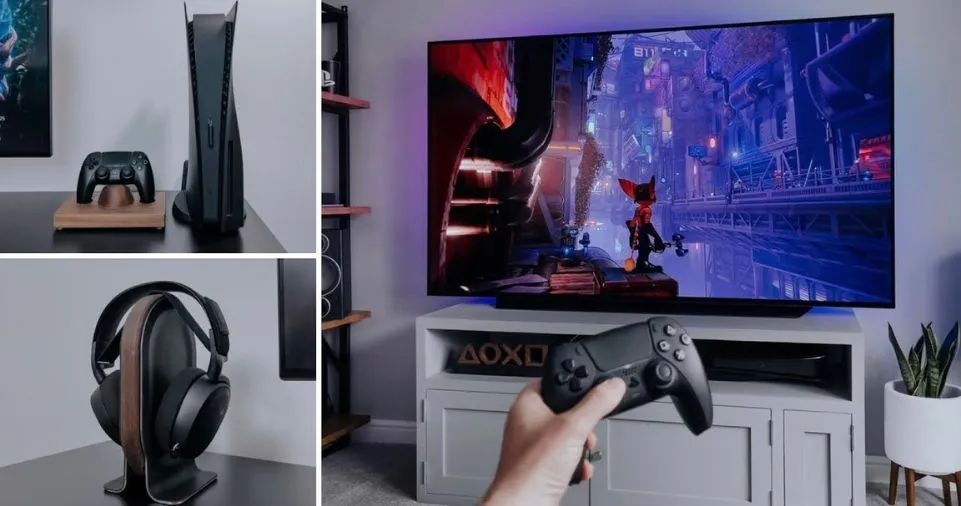
Your controller is your primary interface with the gaming world, making it the most critical accessory to optimize. Modern console gaming demands precision, responsiveness, and comfort during extended play sessions.
Custom Controller Grips and Skins
- Textured grips: Improve handling during intense gaming moments, reducing controller slip during competitive matches
- Custom skins: Protect your controller from wear while adding personalized aesthetics to match your gaming setup
- Thumbstick covers: Enhance analog stick precision with raised or concave designs for better control in FPS and racing games
Premium Thumbstick Upgrades Upgrading your standard thumbsticks can improve response time by 15-20% in competitive scenarios. Options include:
- Concave designs for FPS games (Call of Duty, Battlefield)
- Domed surfaces for racing and sports titles
- Extended height variants for increased leverage and control
Controller Storage and Organization Solutions
Wall-Mounted Controller Holders Transform unused wall space into functional storage with adhesive-mounted holders designed specifically for Xbox, PlayStation PS5/PS4, Nintendo Switch Pro Controllers, and universal gamepad designs. These accessories:
- Free up desk and shelf space
- Keep controllers charged and ready
- Create an organized, professional gaming environment
- Support both single and dual controller configurations
Under-Desk Controller Hangers Reclaim valuable desk real estate by utilizing under-desk mounting solutions. These universal adhesive hangers work with:
- PlayStation DualSense and DualShock controllers
- Xbox Series X/S and Xbox One controllers
- PC gaming controllers
- Nintendo Switch Pro Controllers
Audio Enhancement Solutions: Immersive Sound Experience
Gaming Headsets: The Foundation of Audio Excellence
A quality gaming headset is essential for immersive gameplay and clear communication. According to gaming experts, audio cues can provide up to 70% of situational awareness in competitive multiplayer games.
Key Features to Prioritize:
- Noise cancellation: Blocks external distractions during critical gameplay moments
- Padded ear cups: Memory foam with cooling gel technology prevents discomfort during marathon gaming sessions
- Removable microphone: Flexibility for single-player and multiplayer scenarios
- 7.1 surround sound: Spatial audio for enhanced directional awareness in FPS games
Earpad Upgrades: Comfort Meets Performance
Transform your existing gaming headset with replacement earpads featuring:
- Cooling gel technology: Reduces heat buildup during extended 3-5 hour gaming sessions
- Memory foam construction: Conforms to your head shape for personalized comfort
- Breathable materials: Micro suede, perforated leather, or hybrid fabrics
- Enhanced sound isolation: Thicker padding blocks ambient noise by up to 30dB
Compatible options exist for popular brands including:
- SteelSeries Arctis (1, 3, 5, 7, 9, Pro, Nova series)
- HyperX Cloud (1, 2, Alpha, Flight series)
- Sony MDR-7506 and PlayStation headsets
- Turtle Beach, Audio Technica, Sennheiser, and Bose models
Alternative Audio Solutions
Soundbar Systems For gamers who prefer open-air audio or share their space with others, wireless Bluetooth soundbars offer:
- Room-filling surround sound without headphone fatigue
- Easy connectivity with modern consoles via HDMI ARC or optical connections
- Voice command integration with smart home systems
Acoustic Treatment Enhance audio quality while being considerate of neighbors and roommates:
- Sound-absorbing rugs and curtains reduce echo
- Free-standing acoustic panels optimize room acoustics
- Strategic furniture placement creates natural sound dampening
Display and Visual Upgrades: Elevating Image Quality
High-Refresh Rate Monitors and TVs
Modern console gaming supports refresh rates of 120Hz and above gaming monitors on Xbox Series X/S and PlayStation 5, dramatically improving visual fluidity and competitive responsiveness.
Optimal Display Specifications for Console Gaming:
- Refresh rate: 120Hz minimum for competitive gaming, 60Hz acceptable for casual play
- Response time: 1-5ms for reduced input lag
- Resolution: 4K (3840 x 2160) for next-gen consoles, 1080p minimum for older systems
- Display technology: OLED for superior contrast, LED for brighter rooms
Gaming Projectors: Large-Scale Immersion
Gaming projectors create cinema-quality experiences perfect for multiplayer party games like Mario Kart 8, FIFA, or split-screen titles.
Projector Selection Criteria:
- 1500 lumens: Suitable for darkened rooms with controlled lighting
- 3000-3500 lumens: Better performance in rooms with ambient light
- Low input lag: Under 30ms for responsive gameplay
- High resolution: 1080p minimum, 4K preferred for immersive experiences
TV Mounting and Positioning
Swivel TV Mounts High-resolution LED or OLED TVs on adjustable swivel mounts provide:
- Optimal viewing angles for multiple seating positions
- Flexibility for both solo and group gaming sessions
- Reduced glare from windows or lighting sources
Comfort and Ergonomic Accessories: Gaming Without Pain
Professional Gaming Chairs
An ergonomic gaming chair is no longer optional for serious console gamers. Extended gaming sessions demand proper support to prevent back pain, neck strain, and poor posture.
Essential Gaming Chair Features:
- Lumbar support: Adjustable cushioning maintains natural spine curvature
- Adjustable armrests: 3D or 4D adjustment prevents shoulder and wrist strain
- Headrest padding: High-quality memory foam for neck support during intense gameplay
- Breathable materials: Mesh or perforated leather prevents heat buildup
- Recline functionality: 90-180 degree adjustment for relaxation between matches
Alternative Seating Solutions
Space-Conscious Options:
- Bean bag chairs: Casual comfort for relaxed gaming sessions
- Recliners: Full-body support with footrest functionality
- Couches and sectionals: Ideal for multiplayer gaming with friends and family
- Floor cushions: Japanese-style seating for minimalist gaming spaces
Comfort Accessories for Extended Sessions
Headphone Pressure Relief For gamers who wear glasses, accessories like pressure-relief clips reduce discomfort from headphone clamping force by up to 60%, allowing you to maintain focus during competitive matches without constant adjustment breaks.
Wrist and Arm Support
- Gaming desk armrests for controller users
- Wrist pads for keyboard/mouse hybrid setups
- Adjustable monitor arms to reduce neck strain
Organization and Storage Solutions: Declutter Your Gaming Space
Desktop Organization Systems
Dual Game Controller Stands Desktop holder stands accommodate:
- Two controllers simultaneously (Xbox, PlayStation, PC, Nintendo)
- TV remote controls in dedicated slots
- Small accessories (charging cables, thumbstick covers)
- Pen and stationary storage for streaming setups
Keyboard and Mouse Holders Even console gamers using keyboard/mouse compatibility benefit from desktop stands that:
- Reduce desk clutter by 40-50%
- Protect peripherals from dust and damage
- Create dedicated spaces for each accessory
- Support keyboards of any size with universal designs
Headphone Storage Solutions
Desktop Headphone Stands Purpose-built stands designed for gaming headsets like SteelSeries Arctis Nova Pro Wireless include:
- Integrated docking stations for wireless base units
- Cable management channels
- RGB lighting integration
- Premium materials (aluminum, tempered glass)
Wall-Mounted Headphone Hangers Adhesive-mounted hangers utilize vertical space effectively:
- Single or dual headphone capacity
- Compatible with all headset sizes
- No drilling required for apartment-friendly installation
- Supports weights up to 5 pounds
Cable Management and Power Solutions
Surge Protectors with USB Integration Protect expensive gaming equipment while adding convenience:
- Multiple AC outlets (6-12 ports typical)
- Built-in USB charging ports (2.4A minimum for fast device charging)
- Surge protection rating: 1000+ joules recommended
- Rotating or pivoting outlets accommodate large power adapters
Cord Organization Accessories
- Cable clips create clean routing along desks and walls
- Cable sleeves bundle multiple cords into single channels
- Velcro ties enable easy reorganization as your setup evolves
- Under-desk cable trays hide power strips and excess cord length
External Storage Drives
Modern games can exceed 100GB in size. External storage solutions prevent:
- Constant game deletion and reinstallation
- Download wait times when switching between titles
- Loss of save data during storage management
Storage Drive Recommendations:
- 2TB minimum capacity for PlayStation 5 or Xbox Series X
- USB 3.0 or higher transfer speeds
- Solid-state drives (SSD) for faster loading times
- Portable designs for LAN party convenience
Lighting and Ambiance: Creating the Perfect Gaming Atmosphere
Programmable RGB Lighting Systems
Smart LED lighting strips and panels transform generic gaming spaces into immersive entertainment hubs. Modern systems offer:
Advanced Lighting Features:
- 16 million color options: Match lighting to game genres, team colors, or personal preferences
- Music synchronization: Lights pulse and change with in-game audio or streaming music
- Game integration: Some systems react to on-screen action in supported titles
- Voice control: Integration with Alexa, Google Home, or Siri
Strategic Lighting Placement:
- Behind TV or monitor for reduced eye strain (bias lighting)
- Under desk edges for ambient floor glow
- Along walls for room perimeter illumination
- Behind furniture for depth and dimension
Remote-Controlled Lighting Solutions
Eliminate light switches with smart bulbs that allow:
- Complete darkness for horror games or cinematic experiences
- Instant bright lighting for breaks or setup adjustments
- Scheduled lighting that dims automatically during typical gaming hours
- Color temperature adjustment (warm white for relaxation, cool white for competitive focus)
Glare Management
Anti-Glare Strategies:
- Position displays perpendicular to windows
- Use blackout curtains during daytime gaming
- Soft, diffused lighting sources instead of harsh direct lights
- Monitor hoods for extreme light control
Connectivity and Technical Upgrades: Foundation of Performance
High-Speed Internet Requirements
Console gaming performance depends heavily on network connectivity. According to industry standards:
Minimum Internet Speeds by Gaming Type:
- Casual single-player: 3-5 Mbps download
- Online multiplayer: 15-25 Mbps download, 5 Mbps upload
- Competitive gaming: 50+ Mbps download, 10+ Mbps upload
- 4K streaming while gaming: 100+ Mbps download recommended
Wireless vs. Wired Connectivity
Wired Ethernet Benefits:
- Lower latency (10-30ms reduction vs. WiFi)
- More stable connection with zero packet loss
- No interference from other wireless devices
- Maximum available bandwidth utilization
Wireless Improvements:
- WiFi 6 (802.11ax) routers reduce latency by 40%
- 5GHz band reduces interference compared to 2.4GHz
- Mesh systems eliminate dead zones in larger homes
- Gaming-optimized routers with QoS (Quality of Service) prioritization
Wireless Peripheral Advantages
Wireless Gaming Accessories:
- Controllers: No-lag wireless Xbox and PlayStation controllers
- Keyboards: Low-latency 2.4GHz or Bluetooth mechanical keyboards
- Mice: Advanced optical sensors with 1ms response time
- Headsets: Premium wireless audio with 20+ hour battery life
Accessory Comparison: Finding the Right Fit for Your Gaming Style
Gaming Accessory Impact Assessment
| Accessory Category | Performance Impact | Comfort Impact | Setup Aesthetics | Cost Range | Priority Level |
|---|---|---|---|---|---|
| Controller Upgrades | High (15-20% precision improvement) | Medium | Low | $10-$40 | Essential |
| Gaming Headset | High (70% situational awareness) | High | Medium | $50-$300 | Essential |
| Ergonomic Chair | Low | Very High | Medium | $150-$600 | Essential for 3+ hour sessions |
| Storage Solutions | Medium (eliminates game management) | Low | High | $60-$150 | Important |
| RGB Lighting | None | Low | Very High | $30-$200 | Optional |
| High-Refresh Monitor | Very High (120Hz competitive advantage) | Low | High | $200-$800 | Essential for competitive |
| External Storage | High (faster load times with SSD) | None | Low | $80-$250 | Important |
| Controller Holders | None | Low | High | $15-$50 | Nice to have |
| Surge Protector | None (equipment protection) | None | Low | $25-$60 | Essential |
| Cooling Earpads | Medium (reduced fatigue) | Very High | Low | $20-$45 | Important for 2+ hour sessions |
Budget-Based Accessory Recommendations
| Budget Tier | Total Investment | Essential Accessories | Expected Improvements |
|---|---|---|---|
| Entry Level ($100-$250) | Starter package | Gaming headset ($60), controller grips ($15), basic cable management ($10), surge protector ($30) | 25% comfort improvement, basic audio immersion |
| Mid-Range ($250-$600) | Balanced upgrade | Quality headset ($150), gaming chair ($200), RGB lighting ($50), controller holders ($25), premium earpads ($35) | 50% overall experience enhancement, professional appearance |
| Enthusiast ($600-$1,200) | Comprehensive setup | Premium wireless headset ($250), ergonomic chair ($400), 120Hz monitor ($350), external SSD ($100), full lighting system ($120) | 75% competitive advantage, maximum comfort |
| Professional ($1,200+) | Elite configuration | Top-tier everything including OLED TV ($800), racing wheel/flight stick ($300), soundbar ($200), standing desk ($400), smart lighting ($150) | 90% optimization, streaming-ready setup |
Practical Tips: Maximizing Your Accessory Investment
Setup Optimization Strategies
- Start with Essentials: Prioritize comfort and audio before aesthetics – a quality headset and ergonomic seating impact gameplay more than RGB lighting
- Measure Your Space: Before purchasing, measure available desk space, wall dimensions, and seating distance to displays (optimal viewing distance: 1.5-2x diagonal screen size)
- Consider Room Acoustics: Hard surfaces (hardwood, tile) benefit more from acoustic treatment than carpeted rooms
- Plan Cable Routes: Map power outlet locations and cable paths before mounting accessories permanently
- Test Before Permanent Installation: Use temporary mounting solutions (command strips, removable adhesive) to test accessory placement before drilling or permanent adhesive application
Maintenance and Care Recommendations
Gaming Headset Care:
- Clean earpads weekly with microfiber cloth
- Replace earpads every 6-12 months for optimal comfort
- Store on headphone stand to prevent headband stretching
- Disconnect cables carefully to avoid port damage
Controller Maintenance:
- Clean thumbsticks with cotton swabs and isopropyl alcohol monthly
- Replace worn thumbstick covers immediately (degraded grip reduces precision)
- Charge wireless controllers after each session (prevents battery degradation)
- Update firmware regularly for performance improvements
Display Care:
- Dust screens weekly with microfiber cloth (never paper towels)
- Adjust brightness to 80% maximum (extends panel lifespan)
- Enable screen savers or auto-shutoff for OLED displays
- Position away from direct sunlight (prevents screen damage)
Common Mistakes to Avoid
❌ Overspending on Aesthetics: RGB lighting won’t improve your K/D ratio ✅ Instead: Invest in performance accessories first, aesthetics second
❌ Ignoring Ergonomics: “Gaming through the pain” leads to chronic injuries ✅ Instead: Quality chairs and posture support prevent long-term health issues
❌ Buying Incompatible Accessories: Not all accessories work with all consoles ✅ Instead: Verify compatibility for your specific PlayStation, Xbox, or Nintendo model
❌ Neglecting Cable Management: Tangled cables create fire hazards and look unprofessional ✅ Instead: Budget $20-30 for proper cable organization solutions
Platform-Specific Accessory Considerations
PlayStation 5 / PlayStation 4 Optimization
Exclusive Accessories:
- DualSense charging stations with dual controller support
- PSVR 2 accessories (headset stands, controller holsters)
- PlayStation-branded vertical stands for space efficiency
- Media remote for streaming apps (Netflix, Disney+, HBO Max)
Performance Enhancements:
- M.2 SSD expansion (PS5) for increased storage speed
- USB hub for multiple peripheral connections
- Cooling stations with fan assistance (debated effectiveness)
Xbox Series X/S / Xbox One Enhancement
Exclusive Accessories:
- Rechargeable battery packs (eliminates disposable battery waste)
- Kinect adapter for backward compatibility
- Xbox wireless adapter for PC gaming hybrid setups
- Chatpad for message typing and voice commands
Unique Features:
- Quick Resume support across external SSDs
- Xbox Game Pass streaming accessories
- Cross-platform peripheral compatibility
Nintendo Switch Versatility
Docked Mode Accessories:
- Pro Controller stands and charging docks
- USB-C to Ethernet adapter (eliminates WiFi lag)
- Cooling dock stations
- Joy-Con charging grips
Portable Mode Enhancements:
- Protective carrying cases
- Tempered glass screen protectors
- Grip cases for handheld comfort
- External battery banks for extended play
Future-Proofing Your Gaming Setup
Emerging Accessory Technologies
Haptic Feedback Innovations: Next-generation controllers and chairs featuring advanced haptic feedback create physical sensations matching in-game actions (explosions, vehicle vibrations, environmental effects).
AI-Powered Lighting: Machine learning algorithms that automatically adjust lighting based on game genre, time of day, and user preferences without manual programming.
Adaptive Accessories: Microsoft’s Adaptive Controller and similar accessibility-focused peripherals enable gaming for players with physical disabilities through customizable input methods.
Investment Protection Strategies
- Choose Universal Compatibility: Accessories that work across multiple platforms protect against console generation changes
- Prioritize Build Quality: Spending 30% more on premium materials often doubles accessory lifespan
- Warranty Considerations: Extended warranties make sense for accessories over $100 (headsets, chairs, displays)
- Modular Systems: Select lighting, storage, and mounting solutions that expand as your needs grow
Conclusion: Transform Your Console Gaming Experience Today
The difference between an average gaming setup and an exceptional one isn’t just about the console itself—it’s about the carefully selected accessories that enhance every aspect of your gaming experience. From the 15-20% precision improvement provided by quality controller upgrades to the 70% situational awareness boost from immersive audio solutions, strategic accessory investment directly translates to better performance and enjoyment.
Whether you’re building your first dedicated gaming space or optimizing an existing setup, remember that the most effective upgrades prioritize three key areas:
- Comfort: Ergonomic chairs, cooling earpads, and proper lighting prevent fatigue during extended sessions
- Performance: High-refresh displays, quality audio, and responsive controllers provide competitive advantages
- Organization: Smart storage and cable management create distraction-free gaming environments
Your Next Steps
Ready to transform your console gaming experience? Start with these actionable steps:
Immediate Actions (This Week):
- Assess your current setup’s weaknesses (comfort, storage, audio, or visual)
- Set a realistic budget based on your gaming frequency and priorities
- Measure your available space for new accessories
Short-Term Goals (This Month):
- Invest in one essential upgrade (quality headset or ergonomic chair recommended)
- Implement basic cable management and organization
- Research platform-specific accessories for your console
Long-Term Vision (Next 3 Months):
- Complete your core accessory setup with storage, lighting, and display upgrades
- Fine-tune your configuration based on real-world usage
- Join gaming communities to share setups and gather optimization ideas
Take Action Now
Don’t let outdated or missing accessories hold back your gaming potential. The average gamer now spends 14 hours per week gaming—that’s 728 hours annually. Even small comfort improvements and performance enhancements compound dramatically over hundreds of gaming sessions.
Share your gaming setup transformation in the comments below! What accessories made the biggest difference in your gaming experience? Are you planning any upcoming upgrades? Your insights help fellow gamers make informed decisions.
Looking for more gaming optimization guides? Subscribe to receive expert recommendations on gaming hardware, setup tutorials, and exclusive deals on premium accessories. Transform your gaming space from ordinary to extraordinary—one accessory at a time.